Agent Permission Management
Control which A2A agents can be accessed by specific keys or teams in LiteLLM.
Overview
Agent Permission Management lets you restrict which agents a LiteLLM Virtual Key or Team can access. This is useful for:
- Multi-tenant environments: Give different teams access to different agents
- Security: Prevent keys from invoking agents they shouldn't have access to
- Compliance: Enforce access policies for sensitive agent workflows
When permissions are configured:
GET /v1/agentsonly returns agents the key/team can accessPOST /a2a/{agent_id}(Invoking an agent) returns403 Forbiddenif access is denied
Setting Permissions on a Key
This example shows how to create a key with agent permissions and test access.
1. Get Your Agent ID
- UI
- API
- Go to Agents in the sidebar
- Click into the agent you want
- Copy the Agent ID
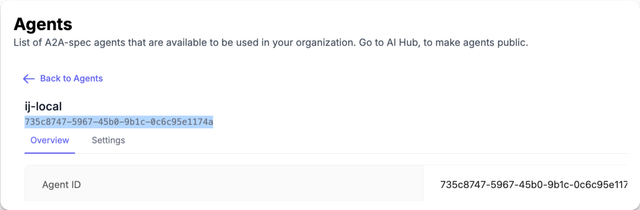
List all agents
curl "http://localhost:4000/v1/agents" \
  -H "Authorization: Bearer sk-master-key"
Response:
Response
{
  "agents": [
    {"agent_id": "agent-123", "name": "Support Agent"},
    {"agent_id": "agent-456", "name": "Sales Agent"}
  ]
}
2. Create a Key with Agent Permissions
- UI
- API
- Go to Keys → Create Key
- Expand Agent Settings
- Select the agents you want to allow
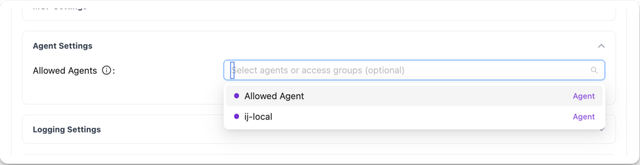
Create key with agent permissions
curl -X POST "http://localhost:4000/key/generate" \
  -H "Authorization: Bearer sk-master-key" \
  -H "Content-Type: application/json" \
  -d '{
    "object_permission": {
      "agents": ["agent-123"]
    }
  }'
3. Test Access
Allowed agent (succeeds):
Invoke allowed agent
curl -X POST "http://localhost:4000/a2a/agent-123" \
  -H "Authorization: Bearer sk-your-new-key" \
  -H "Content-Type: application/json" \
  -d '{"message": {"role": "user", "parts": [{"type": "text", "text": "Hello"}]}}'
Blocked agent (fails with 403):
Invoke blocked agent
curl -X POST "http://localhost:4000/a2a/agent-456" \
  -H "Authorization: Bearer sk-your-new-key" \
  -H "Content-Type: application/json" \
  -d '{"message": {"role": "user", "parts": [{"type": "text", "text": "Hello"}]}}'
Response:
403 Forbidden Response
{
  "error": {
    "message": "Access denied to agent: agent-456",
    "code": 403
  }
}
Setting Permissions on a Team
Restrict all keys belonging to a team to only access specific agents.
1. Create a Team with Agent Permissions
- UI
- API
- Go to Teams → Create Team
- Expand Agent Settings
- Select the agents you want to allow for this team
Create team with agent permissions
curl -X POST "http://localhost:4000/team/new" \
  -H "Authorization: Bearer sk-master-key" \
  -H "Content-Type: application/json" \
  -d '{
    "team_alias": "support-team",
    "object_permission": {
      "agents": ["agent-123"]
    }
  }'
Response:
Response
{
  "team_id": "team-abc-123",
  "team_alias": "support-team"
}
2. Create a Key for the Team
- UI
- API
- Go to Keys → Create Key
- Select the Team from the dropdown
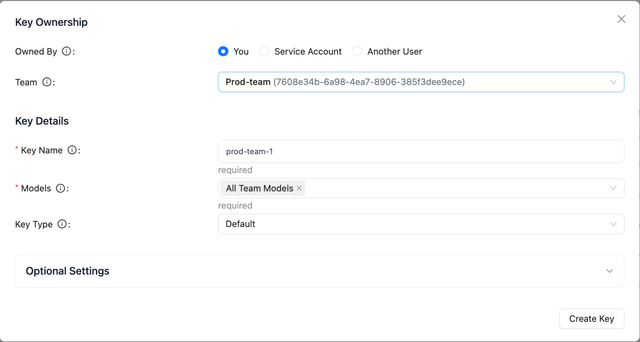
Create key for team
curl -X POST "http://localhost:4000/key/generate" \
  -H "Authorization: Bearer sk-master-key" \
  -H "Content-Type: application/json" \
  -d '{
    "team_id": "team-abc-123"
  }'
3. Test Access
The key inherits agent permissions from the team.
Allowed agent (succeeds):
Invoke allowed agent
curl -X POST "http://localhost:4000/a2a/agent-123" \
  -H "Authorization: Bearer sk-team-key" \
  -H "Content-Type: application/json" \
  -d '{"message": {"role": "user", "parts": [{"type": "text", "text": "Hello"}]}}'
Blocked agent (fails with 403):
Invoke blocked agent
curl -X POST "http://localhost:4000/a2a/agent-456" \
  -H "Authorization: Bearer sk-team-key" \
  -H "Content-Type: application/json" \
  -d '{"message": {"role": "user", "parts": [{"type": "text", "text": "Hello"}]}}'
How It Works
| Key Permissions | Team Permissions | Result | Notes |
|---|---|---|---|
| None | None | Key can access all agents | Open access by default when no restrictions are set |
["agent-1", "agent-2"] | None | Key can access agent-1 and agent-2 | Key uses its own permissions |
| None | ["agent-1", "agent-3"] | Key can access agent-1 and agent-3 | Key inherits team's permissions |
["agent-1", "agent-2"] | ["agent-1", "agent-3"] | Key can access agent-1 only | Intersection of both lists (most restrictive wins) |
Viewing Permissions
- UI
- API
- Go to Keys or Teams
- Click into the key/team you want to view
- Agent permissions are displayed in the info view
Get key info
curl "http://localhost:4000/key/info?key=sk-your-key" \
  -H "Authorization: Bearer sk-master-key"